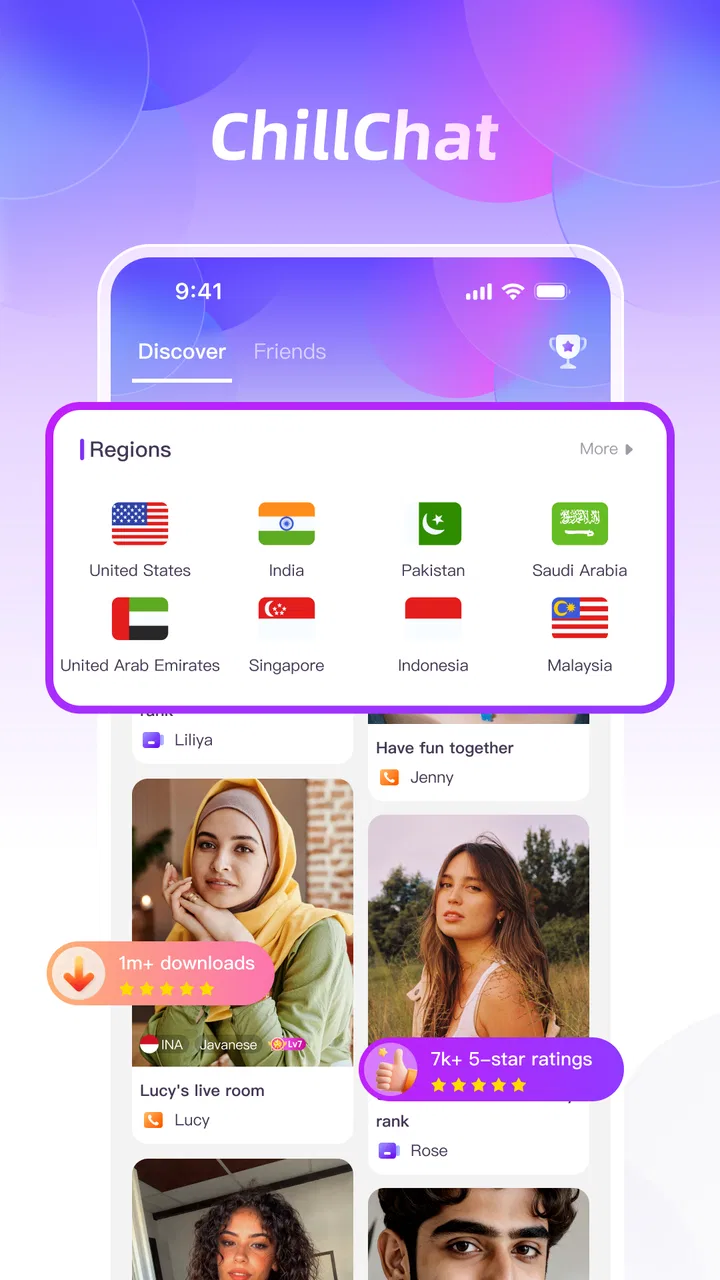
ChillChat - Live Chat & Game
- 4.1
- Rating
- 5.00M
- Installs
- Free
- Price

 Analysis by App-foxy
I installed ChillChat because I wanted to see whether a communication app built around group conversation and casual play could make it easier to bring people together. The basic idea is appealing: instead of opening one app for messages and another for entertainment, you use one shared space for chatting and playing together. In practice, that makes it most interesting for friends who need a reason to keep a conversation moving, not for people looking for a full replacement for a serious messaging service.
ChillChat is a free communication app from Mangostar Team, with a mature seventeen-plus age rating. It is available for devices running Android 7.0 or later, and its current version is 1.1.0. The app has reached over five million installs and holds an average rating of 4.1 from around twenty-seven thousand ratings, which suggests that the concept has found a sizeable audience while still leaving room for personal preferences and occasional friction.
From a quiet group chat to a shared activity
The clearest way to understand ChillChat is to imagine a familiar situation. A group of friends has an existing chat, but the conversation has slowed down. Someone wants to suggest a quick activity, another person is only available for a few minutes, and a third would rather stay in the same conversation than jump between several apps. That is the starting condition where this app makes sense.
You May Also Like

 Blood Strike: 2.5 Anniversary
Blood Strike’s Loadouts Turn Every Drop Into a Tactical Gamble
A close look at Blood Strike’s custom loadouts: how fast access to signature weapons reshapes its battle royale rhythm, rewards preparation, and narrows the gap between fights.

 Pandora - Music & Podcasts
Pandora’s Music Is Easy to Start, but Harder to Recover
Pandora’s strength is its low-effort path from a seed to a station. Its weak spot is how much confidence it asks you to place in connection, setup, and quiet recovery.

 8 Ball Pool
 Is Built on Rivalries, Rematches, and Routine
A close look at the rivalries, rematches, shared routines, and unanswered safety questions that turn a quick pool match into a persistent mobile community.

 Samsung Music
’s Quiet Strength Is Playing What You Already Own
Its reach comes less from spectacle than from dependable access to a personal library. That simplicity is both the app’s strongest retention engine and its ceiling.

 AccuWeather: Weather Radar
AccuWeather Review: A Quick, Clear Forecast for Everyday Decisions
For everyday plans, the best forecast is the one you can understand quickly. AccuWeather makes rain timing, radar, and local conditions easy to act on, with a few trade-offs.

 Hill Climb Racing
Why Hill Climb Racing Still Turns Crashes Into One More Run
A tiny car, a bumpy hill and one more upgrade: Hill Climb Racing keeps resurfacing because its simple chaos makes every near-miss feel personal.
More From Our News Desk



I found the combination of group chat and casual games more useful than the short store summary might suggest. The value is not simply having two functions in one place. It is the handoff between them. A message can lead to a shared activity, and the activity can give the group something immediate to discuss afterward. That small change in rhythm helps avoid the awkward “what should we do?” stage that often kills a group plan.
Still, I would not treat it as a universal communication tool. If your priority is formal work messages, long-running community organization, detailed file exchange, or a carefully managed family communication channel, a conventional messenger may be a better fit. ChillChat is aimed more at quick social contact, relaxed groups, and people who enjoy interaction with a playful element.
Setting up the first conversation
The first useful test is not whether the app looks entertaining on its own, but whether another person can join the experience without confusion. For that reason, I would begin with one small group rather than inviting everyone at once. A group of three or four people is enough to reveal whether the chat feels natural, whether the transition into play is easy to understand, and whether everyone actually wants the same kind of interaction.
That approach also reduces a common problem with social apps: an empty space can make the product seem less useful than it is. ChillChat depends on participation. With nobody available, the game-oriented side has less purpose, and the communication side can feel like another unused inbox. Bringing in a small, willing group gives the app a fairer test and makes its main advantage visible from the beginning.
My practical advice is to agree on the purpose of the group before inviting people. A short evening chat, a quick break between classes, and a recurring friend group all need different expectations. ChillChat works best when people understand that the room is for informal conversation and shared activity, rather than assuming it will behave like a general-purpose messaging archive.
Moving from messages into play
The important workflow is the movement from conversation to participation. Someone starts with a message, the group responds, and the shared activity becomes the next step instead of an unrelated distraction. That handoff is the feature I would pay the most attention to during a trial. If your group can move naturally without repeatedly explaining what to tap or where to go, the app has done its job.
I also found that the app is better suited to short, low-pressure sessions than to carefully scheduled events. A person who joins late should be able to understand the context from the active conversation, while someone who leaves early should not feel that they have broken the whole session. This makes ChillChat a reasonable choice for spontaneous social time, especially when availability changes from person to person.
There is a useful planning trick here: use the chat to establish a simple starting point, then let the activity carry the interaction. Avoid turning the first session into a complicated event with too many rules or expectations. The less preparation required, the more clearly you can judge whether the app adds something that your normal messenger does not.
How the handoffs affect different users
Every group contains different levels of enthusiasm. One person may want to play immediately, another may prefer to talk, and someone else may only be checking messages briefly. A good shared app needs to accommodate those differences without making the less active participant feel like an obstacle. ChillChat’s combined format is promising for this situation because conversation and play can exist in the same social setting, but the experience still depends heavily on the group’s manners.
I would use the chat as the coordination layer rather than assuming everyone will notice an activity automatically. A clear message explaining what the group is doing helps late arrivals and prevents the session from becoming confusing. This is one of the less obvious lessons from using a combined communication-and-game app: the more functions a room offers, the more valuable simple human instructions become.
For a close group of friends, that handoff can feel effortless. For a large group of acquaintances, it may be less smooth. People may join for different reasons, and the conversation can become noisy when several interactions happen at once. If your main need is a quiet, focused exchange with a few important contacts, a standard messenger with strong organization tools may serve you better.
What the app is like on a normal day
A realistic everyday use case would be a group of friends checking in after work or school. One person opens the conversation during a short break, another responds later, and the group decides to spend a little time together rather than exchanging isolated messages. The app is useful in that moment because it lowers the distance between “we are talking” and “we are doing something together.”
I can also see it working for friends who live in different places and do not want every interaction to become a formal video call. A lightweight shared activity gives the group a focus without requiring a long conversation. That is especially helpful when people are tired or when nobody has a major update to share but everyone still wants some contact.
On the other hand, I would skip it for one-to-one conversations where the game element is irrelevant. If you only need dependable direct messaging, adding a social layer may not improve your routine. The same applies to professional communication: the playful atmosphere that helps friends connect could feel distracting or inappropriate in a work setting.
Where ChillChat compares well with ordinary messengers
Compared with a typical messaging app, ChillChat has a more active reason for people to remain in the conversation. Standard messengers are usually excellent at sending text and maintaining a history, but they often leave the group responsible for finding its own activity. ChillChat addresses that gap by placing communication and shared play closer together.
The trade-off is depth. Established messaging platforms often provide mature contact management, broad sharing options, detailed notification controls, and familiar workflows built around years of use. ChillChat’s appeal is narrower and more social. It can be more engaging for a friend group that wants a quick activity, but it may not be the best place to manage every kind of conversation.
It also differs from a dedicated game platform. A full game service normally emphasizes game discovery, progression, competitive systems, or a large player community. ChillChat is more about the social moment around playing. If your priority is deep gameplay or long-term advancement, a dedicated game will probably be more satisfying. If your priority is getting a group talking and participating with minimal separation between the two, this app has the stronger argument.
Small-group habits that improve the experience
The first useful habit is to keep the initial group deliberately small. This is not just a matter of convenience. It gives every participant a clearer role in the conversation and makes it easier to see whether the shared activity actually strengthens the interaction. Once the group understands the flow, you can decide whether a larger room would improve the experience or simply add noise.
The second is to treat the chat as a handoff record. When changing from conversation to play, write a short explanation rather than relying on everyone to follow at the same moment. This helps people who are multitasking, joining late, or using the app less confidently. It also prevents the common social problem where two people begin an activity while the rest of the group are unsure what happened.
The third is to use the app as a flexible drop-in space. Do not make every session depend on perfect attendance. ChillChat is more convincing when people can participate for a short time, return later, or simply observe the conversation. That flexible structure makes it better for busy friends than a rigid plan that collapses when one person is unavailable.
A fourth consideration is spending. The app is free to download and use, but it includes in-app purchases ranging from $0.99 to $149.99 per item. I would approach those purchases carefully, particularly in a social setting where people may feel pressure to match what others have access to. Before paying, decide whether the purchase improves your own experience or merely responds to group momentum. The free entry point is a strength, but the presence of optional spending means families and younger users should discuss boundaries in advance.
Privacy, age, and group boundaries
The mature seventeen-plus rating matters when deciding who should be invited. I would not treat this as a casual app for children simply because the interface combines chat and games. Communication spaces can change quickly depending on who joins, and the age rating is a clear signal that adults and older teenagers should be the intended audience.
For a private friend group, establish basic boundaries before the conversation becomes busy. Decide who should be included, what kind of topics belong in the room, and how the group will handle someone who no longer wants to participate. These are not glamorous setup steps, but they have a direct effect on whether the app remains comfortable over time.
I would also avoid assuming that a game-oriented room is automatically low-risk. The social layer is still the central experience, and users should apply the same caution they would use in any online conversation. Keep personal information limited, be selective about invitations, and do not let the playful format make you ignore uncomfortable behavior.
Where the workflow breaks down
The biggest weakness is dependence on a willing group. If your friends already use another messenger and do not want to add another app, ChillChat may struggle to become part of the routine. Its advantages appear after people are together; before that point, you still have to persuade them to install, join, and participate.
Another point of friction is the tension between conversation and activity. Some users want messages to remain the main focus, while others may treat the game as the reason for opening the app. Without a shared expectation, the room can feel unfocused. A dedicated messenger is better for serious conversation, and a dedicated game is better for players who want depth. ChillChat occupies the middle ground, which is useful but also means it will not lead either category.
Large groups may expose this limitation more quickly. More participants can create more energy, but they can also make messages harder to follow and make the handoff into play less clear. I would test the app with a small circle first rather than assuming that a large community will automatically benefit from the combined format.
There is also a possible mismatch between the free starting point and the presence of purchases. A person may download the app expecting a completely cost-free social experience, then encounter optional items that change how the group interacts. That does not make the app unsuitable, but it does mean that the group should agree on whether purchases are welcome. A clear rule avoids awkward comparisons and keeps the focus on participation.
Who should install it, and who should pass
I would recommend ChillChat to friends who regularly say they should do something together but never settle on an activity. It is also a good candidate for small social circles that enjoy quick interactions and want a shared space with more energy than a standard text thread. The app’s strongest outcome is not a single feature; it is the way a message can become a group moment without requiring a separate platform.
I would be more cautious if your main need is reliable, structured communication. Work teams, large communities, families managing practical information, and users who need a detailed message archive may prefer a conventional messenger. Likewise, serious gamers who care about advanced game systems should look elsewhere for the main entertainment experience.
The app is worth trying when your problem is social inertia. If everyone is already active in another platform and nobody wants a second place to check, the installation may add more friction than value. ChillChat needs a group that is willing to make it part of its routine, even if that routine is only occasional.
My overall result after following the full flow
Starting with a quiet group chat, moving into a shared activity, explaining the transition to late participants, and then returning to conversation shows where ChillChat is most effective. It turns a passive exchange into a more active social session, and that can make a noticeable difference for friends who struggle to keep in touch.
My recommendation is positive but specific: use it as a social side door, not as the only communication tool on your phone. Keep the first group small, set expectations about participation and purchases, and pay attention to whether the activity genuinely helps your conversations. If it does, the app earns a place in your group’s routine. If it does not, a familiar messenger will probably be simpler.
Mangostar Team has created an approachable idea for people who want conversation and play to sit closer together. The free price makes experimentation easy, while the mature age rating and optional purchases call for sensible boundaries. With an average rating of 4.1 and more than five million installs, it is clearly attracting attention, but its real value still depends on the people you bring into the room.
In the end, I would describe ChillChat as a useful bridge between messaging and casual group entertainment. Its best result comes when a real group already wants to spend time together and needs a simple push from talking to doing. That is a narrower promise than replacing every messenger or game, but for the right friends, it is a genuinely practical one.
FAQs for ChillChat - Live Chat & Game
01What is ChillChat - Live Chat & Game?
ChillChat - Live Chat & Game is a social entertainment app that combines live conversations with casual gaming features. It is designed for users who want to meet people, join chats, and spend time playing interactive games in one place. Depending on the available version and region, the app may offer public rooms, private conversations, profiles, virtual items, and community-based activities.
02Is ChillChat - Live Chat & Game free to download and use?
The app can generally be downloaded at no cost, allowing users to explore its main features without paying upfront. However, some functions may include optional in-app purchases, such as virtual goods, premium features, or other enhancements. Before confirming a purchase, review the pricing information shown in the app store and inside the application, especially if children or shared devices may use the account.
03Do I need to create an account to use ChillChat?
ChillChat may allow limited access before registration, but creating an account is usually necessary to use social features fully, save progress, personalize a profile, or interact consistently with other players. Registration requirements can vary by device and app version. Users should read the privacy policy and check which information is requested, such as an email address, phone number, or social login.
04Is ChillChat - Live Chat & Game safe for children?
Because ChillChat combines live communication with online gaming, parents should review the app carefully before allowing a child to use it. Conversations with strangers, user-generated content, virtual purchases, and privacy concerns may be present. Use available privacy, blocking, and reporting controls, avoid sharing personal information, and check the recommended age rating and parental guidance listed on the relevant Android or iOS store.
05Does ChillChat require an internet connection?
Yes, the core experience normally depends on an active internet connection because live chat, matchmaking, online profiles, and multiplayer or social game features communicate with remote servers. Wi-Fi is recommended for longer sessions to reduce mobile data usage and improve stability. If the connection is weak, chats may be delayed, games may disconnect, and some content may fail to load correctly.
Pros
- Quick way to meet people through live conversations and games.
- Interactive games help break the ice with new chat partners.
- Simple interface makes browsing chats easy for first-time users.
- Live format can feel more engaging than traditional messaging apps.
- Useful for casual socializing when you want short conversations.
Cons
- User activity and chat quality may vary significantly by time and region.
- Public conversations can expose you to unwanted messages or behavior.
- Some features may require in-app purchases or premium access.
- Live chat can consume considerable mobile data and battery.
- Privacy settings should be checked carefully before sharing personal details.

ChillChat - Live Chat & Game
Gallery